BO1 Zombies in Browser
ZombiesLoading the original site…
Click inside the game to use its controls. If it stays blank, try Reload or open the original site.
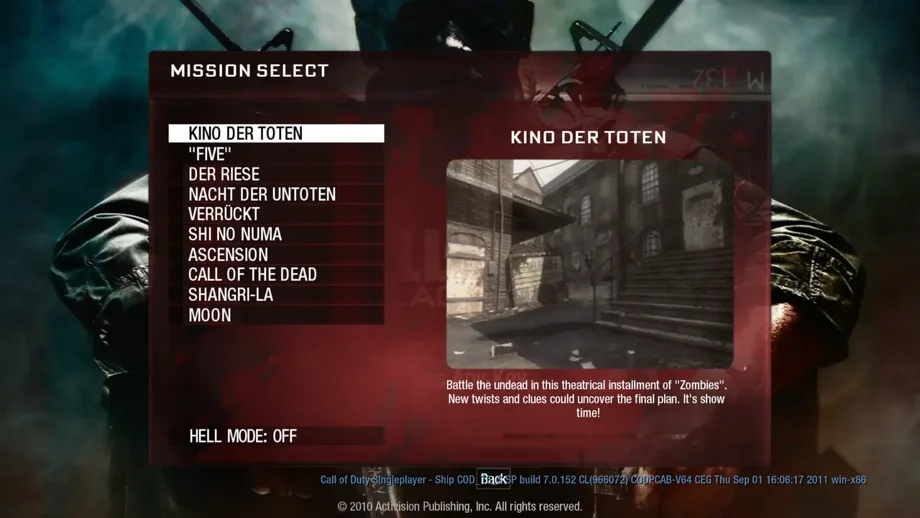
Open original sitePlay BO1 Zombies in Browser in the game window below. The fan-run project opens its classic map selector automatically: choose Kino der Toten, Five, Moon or another listed map, then follow the game’s start prompt.
Use a current desktop Chrome or Edge for this embedded game. No client installation does not mean no download: the selected map loads resources into temporary browser storage. Refreshing or leaving this page can require another download. The original-host link is available if this browser cannot run the player.
Choose a Zombies map
These 10 maps are listed in the project’s current map selector. Each link opens that map on the original host. A listed map is not a completed gameplay test; availability can change.
What is BO1 Zombies in Browser?
BO1 Zombies in Browser describes community projects that bring Black Ops Zombies to a web browser. This page points to vel.gg’s map selector; it is an independent directory, with no affiliation to Activision or Treyarch. It does not distribute game files or promise the complete retail experience.
Choose a map in the embedded game
The player loads automatically when you open this page. Use a current desktop Chrome or Edge, then choose a map in the game’s selector. If the project shows an unsupported-browser message, check its stated graphics, memory and storage requirements.
Pick a map and wait for its resources
Choose Kino der Toten or another map from the list below. The project loads the chosen map’s resources rather than every map at once. Keep the tab open while its download and loading indicators progress; refreshing can interrupt the session.
Enter the game and capture the mouse
Follow the host’s start prompt, then click inside the canvas for mouse aiming. Use its Options menu to adjust sensitivity and volume. Press Esc to release the pointer; click the canvas again when you want to resume.
Controls
The table gives familiar Black Ops PC defaults. Browser input is passed to the game; check the active in-game bindings if a key behaves differently. The host’s Options panel controls mouse sensitivity and volume.
| Action | Key or input |
|---|---|
| Move | W / A / S / D |
| Look and aim | Mouse movement; click the canvas to capture the pointer |
| Fire / aim down sights | Left / right mouse button (PC defaults) |
| Reload / interact | R / F (PC defaults) |
| Jump / sprint | Space / Shift (PC defaults) |
| Release the mouse | Esc; click inside the game to resume |
Frequently asked questions
Can I play BO1 Zombies in Browser without downloading?
You do not install a standalone client to open this project, but playing still requires downloading map and engine resources. The project uses browser storage, so allow storage and leave enough free space. This is not a zero-download service.
Is Kino der Toten available?
Kino der Toten is listed in the current selector and has its own project page. Use the Kino link below to open it directly. The menu and launch page were checked; a full playable round has not been independently verified here.
Which Zombies maps are supported?
The current selector lists Kino der Toten, Five, Der Riese, Nacht der Untoten, Verrückt, Shi No Numa, Ascension, Call of the Dead, Shangri-La and Moon. This describes the browser project’s list, not a guarantee that every original feature or Easter egg works.
What if the embedded BO1 game does not start?
Use a current desktop Chrome or Edge and read the game’s error message. The embedded view needs browser support for its isolated game environment and temporary storage. You can reload the player or open the original project in a separate tab. Persistent resource caching works differently in that original tab.
Does it work on a phone or Chromebook?
The current project rejects mobile devices in its capability check. A Chromebook must satisfy the same desktop browser, graphics, memory and storage requirements; support has not been tested on a specific Chromebook. Use the project’s error message to identify a missing feature.
What if the game stays on the loading screen?
Read the project’s status and error message first. If a download is interrupted, use its Resume or retry option when offered. Check free storage and graphics support. Avoid repeatedly refreshing while progress is moving; the embedded session’s temporary data is cleared when you leave the page.
Is this an official release, and does multiplayer work?
This is a community browser destination, not an official Activision or Treyarch release. The checked landing page presents a solo map selector. Multiplayer, account progression and compatibility with retail servers have not been verified, so do not assume those features carry over.
Sources and availability
Project pages and public scripts checked on October 11, 2026. Full matches, multiplayer and long-session stability have not been tested.